
Zoho Projects Review 2026: Is It Worth It for Project Management?
Zoho Projects combines powerful project planning, time tracking, and resource management with some of the best pricing in the market. During our testing, we found it fast, feature-rich, and particularly strong for managing growing teams and client projects.
It isn't as polished or beginner-friendly as Asana or monday.com, but if value for money matters more than a perfect interface, Zoho Projects is one of the strongest project management tools we've reviewed.
Independent comparisons • No vendor bias • Real-world testing
Best for: Growing businesses, consultants, and teams needing affordable project planning & resource management
No credit card required
Zoho Projects Review SaaSNav Score
★★★★
4.2/5

Quick Verdict - IS zoho projects WORTH IT?
Overall SaaSNav Score: ★★★★ 4.2 / 5
Based on usability, workflow fit, value for money, feature depth, and reliability.
Our testing showed that Zoho Projects excels at helping teams plan and manage work efficiently. Client organization was straightforward using tags, workload reporting made resource planning simple, and the platform remained consistently fast and responsive throughout our review. We were particularly impressed by how much professional functionality is available at such a competitive price.
That said, Zoho Projects isn't without compromises. The onboarding process asks more of new users than many competitors, automation isn't as flexible as ClickUp or monday.com, and several settings—such as task status customization—are hidden deeper in the interface than they should be. None of these issues prevented us from managing projects effectively, but they do contribute to a slightly steeper learning curve.
Best for: Teams that want powerful project management and resource planning without paying premium prices.
Alternatives to consider: ClickUp, Wrike, monday.com
Official site link
Some links on this page may be affiliate links. If you sign up through them, we may earn a commission at no extra cost to you. Our reviews remain independent and unbiased.
How We Tested Zoho Projects
Our independent review of Zoho Projects is based on direct hands-on testing across real-world workflows. We appraised the platform using the independent SaaSNav 5-category scoring framework to provide an analytical, trust-driven assessment of its performance, features, and professional utility.
✓ Hands-on testing within real project workflows
✓ Evaluation across five SaaSNav scoring categories
✓ Pricing, features, and limitations verified at time of writing
Who Zoho Projects Is Built For
Zoho Projects is best suited to growing businesses, consultants, and project teams that need professional planning tools without enterprise-level pricing. Its combination of Gantt charts, workload reporting, time tracking, and strong integration with the wider Zoho ecosystem makes it an excellent choice for teams managing multiple projects and resources.
Best For
-
Growing businesses managing multiple concurrent projects.
-
Teams that need workload planning and resource management.
-
Consultants tracking billable time and project progress.
-
Businesses already using Zoho CRM, Books, or other Zoho applications.
-
Organizations looking for powerful project management at an affordable price.
Might Not Be Ideal For
-
Users who want the simplest possible onboarding experience.
-
Teams that rely heavily on advanced workflow automation.
-
Businesses wanting a highly polished, modern interface like Asana or monday.com.
-
Users expecting every feature to be immediately discoverable.
-
Organizations needing extensive no-code workflow customization.
In summary: Zoho Projects is an excellent choice for businesses that value functionality and affordability over simplicity. While there's a little more to learn than with some competitors, its planning tools, resource management, reporting, and excellent value for money make it one of the strongest project management platforms in its price range.
Official site link
Some links on this page may be affiliate links. If you sign up through them, we may earn a commission at no extra cost to you. Our reviews remain independent and unbiased.
Zoho Projects Alternatives to Consider
If Zoho Projects isn't the perfect fit, several excellent alternatives are worth considering. Whether you prioritize greater customization, a more intuitive interface, or enterprise-grade project controls, these project management platforms each offer distinct advantages.
The most customizable alternative, offering deeper automation, AI capabilities, and highly flexible workflows.
Best for teams that need maximum customization and all-in-one productivity.
A more visual and intuitive platform with excellent workflow management and one of the easiest onboarding experiences.
Best for teams that want structured workflows with an approachable interface.
A powerful alternative focused on advanced reporting, resource management, and enterprise-scale project delivery.
Best for larger teams managing complex projects and cross-functional work.
Some links on this page may be affiliate links. If you sign up through them, we may earn a commission at no extra cost to you. Our reviews remain independent and unbiased.
Is Zoho Projects Good for Freelancers?
Yes. Zoho Projects is an excellent choice for freelancers, consultants, and small businesses that need more than a simple task manager. Its combination of project planning, time tracking, workload management, and affordable pricing makes it particularly appealing for freelancers managing multiple clients or increasingly complex workloads.
Excellent client organization
During our testing, organizing work across multiple clients was straightforward. We created client tags in minutes and were able to group tasks by customer while still maintaining a complete overview of every active project. This flexibility makes Zoho Projects well suited to freelancers balancing several clients at the same time.
Strong planning and time management
Zoho Projects includes Gantt charts, workload reports, time tracking, and automatic task duration calculations that help freelancers stay on top of deadlines and manage their workload efficiently. These features provide much greater visibility than many simpler project management tools.
Great long-term value
As your freelance business grows, Zoho Projects scales with you. The Premium plan is one of the most affordable we've tested, yet still includes professional planning tools, reporting, automation, and integrations. Businesses already using Zoho CRM, Books, or Invoice will benefit even more from the seamless integration between products.
Freelancers looking for the simplest possible project management experience may still prefer Trello or Basecamp, while users wanting extensive workflow automation and customization may find ClickUp a better fit. However, for freelancers who value professional planning features without a premium price tag, Zoho Projects represents outstanding value.
Freelancer Verdict: Zoho Projects is an excellent choice for freelancers who need professional project management without overspending. Its client organization, time tracking, workload planning, and excellent value for money make it particularly well suited to consultants and growing freelance businesses.
Some links on this page may be affiliate links. If you sign up through them, we may earn a commission at no extra cost to you. Our reviews remain independent and unbiased.
Zoho Projects Review: How we rated it
Our independent rating is based on hands-on testing, functional analysis, and real-world productivity workflows.
Usability & Setup Experience
★★★★☆
Zoho Projects offers a capable onboarding experience with interactive walkthroughs and a responsive interface. While registration asks for more information than many competitors and some terminology can feel overwhelming at first, we found the platform intuitive once inside and were quickly creating projects, assigning tasks, and organizing client work.
4.2/5
Real-World Workflow Fit
★★★★☆
Zoho Projects handled everyday project management confidently throughout our testing. Client tagging made it easy to organize work across multiple customers, while Kanban, Gantt, dashboards, and reporting provided the tools needed to manage growing workloads. A handful of interface quirks slightly interrupted the experience, but overall workflow remained efficient and dependable.
4.0/5
Value for Money
★★★★★
Zoho Projects is one of the best-value project management platforms we've reviewed. Its generous Free plan and low-cost Premium tier include features such as Gantt charts, time tracking, reporting, workload management, and automation that often cost considerably more with competing platforms.
4.7/5
Features & Capability Depth
★★★★☆
Zoho Projects delivers an impressive collection of professional project management features. Resource planning, workload reporting, time tracking, and integration with the wider Zoho ecosystem are particular strengths. Automation is useful but less advanced than platforms like ClickUp or monday.com, preventing an even higher score.
4.2/5
Reliability, Support & Limitations
★★★★☆
Throughout our testing, Zoho Projects remained consistently fast and responsive with no noticeable performance issues. We encountered several interface frustrations and found support slower and less intuitive than some competitors, but the team ultimately resolved our query and overall reliability remained excellent.
4.1/5
Official site link
Some links on this page may be affiliate links. If you sign up through them, we may earn a commission at no extra cost to you. Our reviews remain independent and unbiased.
Deep Analysis: How Zoho Projects Performs in Practice
Usability & Setup Experience
Getting started with Zoho Projects takes a little more effort than many competing platforms. During signup we were asked for both a business email address and a phone number, with SMS verification required before we could access the platform. While the registration process felt more involved than tools like Trello or Basecamp, the experience improved noticeably once we were inside.
Zoho guides new users through an onboarding wizard that helps create an initial project, followed by a Quick Start checklist packed with interactive walkthroughs. We found these mini tutorials genuinely helpful, using animations to explain key features without forcing us to leave the workspace. Within a short time we were creating tasks, assigning owners, setting deadlines, and organizing projects with confidence.
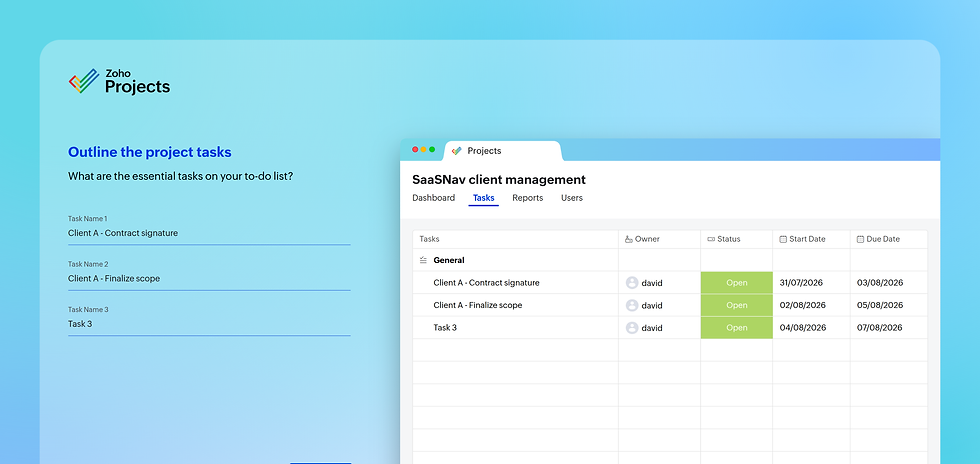
One feature we particularly liked was the automatic task ID generation, which makes referencing tasks much easier as projects grow. We also appreciated the ability to customize the top navigation by hiding sections we weren't using, creating a cleaner and more focused workspace.
There are, however, a few usability compromises. The left-hand navigation introduces terminology such as Issues, Phases, Time Logs, and Timesheets early on, which may feel overwhelming for new users. We also found ourselves occasionally searching for features that weren't located where we'd expected, reinforcing the feeling that Zoho Projects has a steeper learning curve than some competitors.
Overall, Zoho Projects offers a capable and well-structured onboarding experience. It asks more of new users during setup than simpler project management tools, but once you're familiar with the interface, navigation becomes intuitive and the platform feels fast, responsive, and well suited to managing real-world projects.
Screenshot: Zoho Projects' Quick Start experience introduces core features through interactive walkthroughs, helping new users become productive without relying on lengthy documentation.
Real-World Workflow Fit
Once we had Zoho Projects configured, it quickly became clear that it's built for managing real projects rather than simply keeping track of to-do lists.
During our testing, we created multiple client projects and found it refreshingly easy to separate work between them. By creating client tags, we were able to group tasks by customer in just a few clicks while still retaining a complete view of every task across the business. For freelancers, consultants, and agencies juggling multiple clients, this flexibility will prove particularly useful.
Zoho Projects includes all the views we'd expect from a professional project management platform, including List, Kanban, Gantt, and Dashboard views. The Kanban board was responsive and intuitive, allowing us to drag tasks between statuses with ease, while the Gantt chart provided a clear overview of project schedules and dependencies.
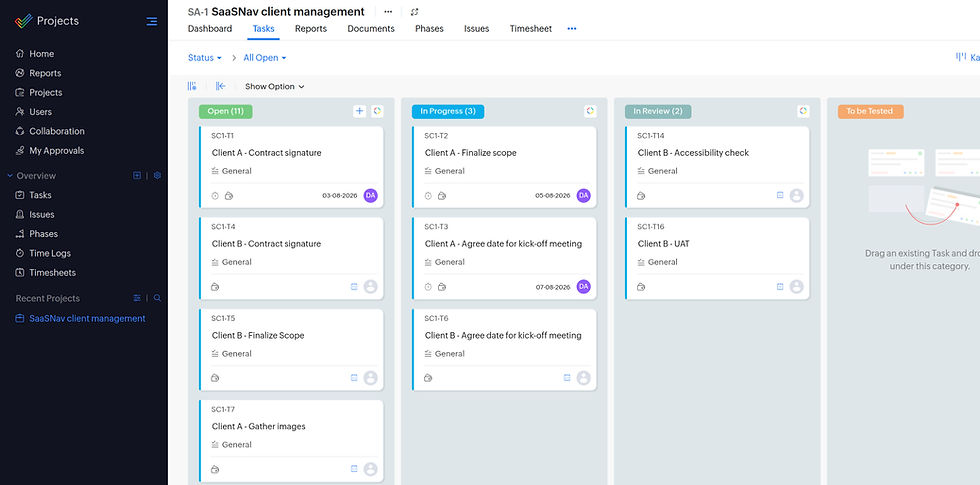
There were a few usability quirks. We initially expected Gantt and Kanban views to appear in the main navigation, but instead discovered them tucked away inside the Tasks menu. We also noticed that newly tagged tasks occasionally remained in the "Ungrouped" section until we refreshed the page. Neither issue prevented us from working, but both interrupted an otherwise smooth workflow.
We also explored task status customization and found it far less intuitive than expected. Changing status names required navigating through several layers of settings rather than being available directly from the board. While the functionality exists, competing platforms make this type of customization much easier to discover.
Overall, Zoho Projects delivers an excellent real-world workflow experience. Its client organization, task management, reporting, and planning tools make it well suited to freelancers, growing businesses, and project teams that need more structure than simpler task management tools can provide. It isn't the most polished platform we've tested, but once you're familiar with where everything lives, it becomes a capable and efficient environment for managing day-to-day work.
Screenshot: Zoho Projects' Kanban board provides a clear overview of project progress, while client tagging makes it easy to organize work across multiple customers.
Features & Capability Depth
Zoho Projects offers one of the most complete feature sets we've tested, particularly for businesses that need more than simple task management.
During our testing, we found its biggest strength wasn't automation—it was project planning and resource management. As soon as we added start and end dates to tasks, Zoho automatically calculated useful fields such as duration and days remaining, making it easy to understand project progress without additional configuration. The built-in Workload Report was equally impressive, giving us an instant overview of team capacity and making it easy to identify users who were over or under allocated.
Automation is available, although it doesn't feel as mature as some competing platforms. Unlike ClickUp or monday.com, Zoho doesn't provide a large library of ready-made workflow templates, and when we created our own automation we found the available actions and triggers to be more limited than we'd expected. For straightforward workflows it performs well, but businesses relying heavily on automation may find competing platforms more capable.
Zoho Projects integrates with a wide range of business tools, including Microsoft 365, Google Workspace, Slack, GitHub, Zapier, and Dropbox. Its real advantage, however, comes from the wider Zoho ecosystem. If your business already uses applications such as Zoho CRM, Books, Invoice, Desk, or Analytics, projects, customers, finances, and support data flow naturally between products, creating a connected business platform rather than a collection of separate tools.
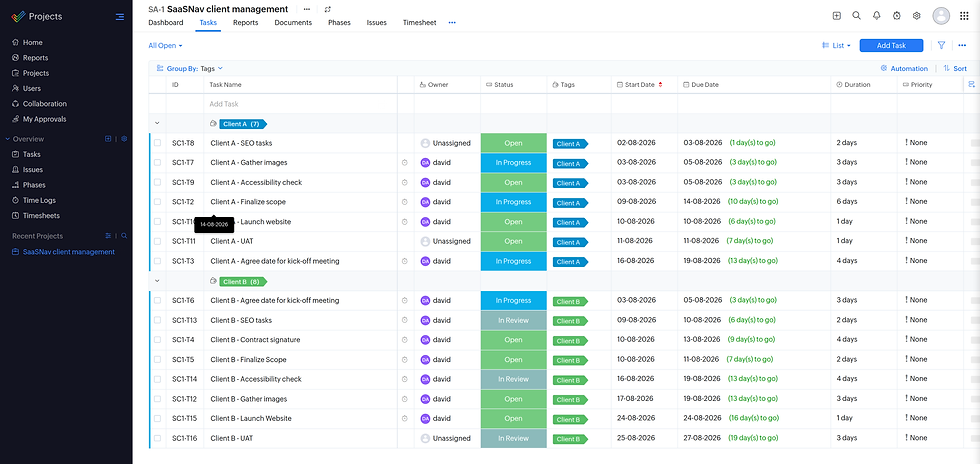
Overall, Zoho Projects delivers excellent capability for its price point. Its planning tools, reporting, time tracking, and resource management rival significantly more expensive platforms. While the automation experience isn't quite as polished as the market leaders, the depth of functionality available—particularly for businesses invested in the Zoho ecosystem—makes it one of the strongest value-for-money project management platforms we've reviewed.
Screenshot: Zoho Projects includes powerful resource planning tools, automation, and workload reporting, making it well suited to teams managing multiple projects simultaneously.
Reliability, Support & Limitations
Throughout our testing, Zoho Projects proved to be one of the fastest and most responsive project management platforms we've reviewed. Pages loaded quickly, task updates happened instantly, and we experienced virtually no lag, even when switching between different project views.
We did, however, encounter several usability frustrations during everyday use. One involved assigning users to tasks near the bottom of the List view, where there wasn't always enough screen space for the selection window to display properly. We also found the tag management workflow unnecessarily cumbersome. Rather than selecting an existing tag from a simple dropdown, we had to begin typing its name, search for it manually, and then press Enter to confirm the selection. Compared with competing platforms, this felt like more work than it should have been.
We also used our testing to evaluate Zoho's customer support. After struggling to customize task status names, we first explored the Help Centre. Surprisingly, we couldn't find a search function within the knowledge base, making it difficult to locate the information we needed. The page tour wasn't particularly helpful either, so we eventually contacted live chat.

The live chat conversation lasted around ten minutes before we received the answer. Support eventually explained that status customization is available, but it's hidden within Settings → Customization → Status Preferences rather than being accessible directly from the task board. While the issue was resolved, we felt competing project management platforms make this type of customization far easier to discover without contacting support.
Overall, Zoho Projects combines excellent reliability with solid customer support. The platform performed exceptionally well throughout our testing, although a handful of interface quirks, hidden configuration options, and a less intuitive support experience mean it doesn't feel quite as polished as the very best project management tools. Even so, none of these limitations significantly detracted from our day-to-day experience using the platform.
Screenshot: We contacted Zoho Projects' live chat after struggling to customize task statuses. Although the response wasn't particularly fast, support successfully guided us to the correct settings.
Capability alone does not determine long-term value. Next, we assess how pricing structure and cost scaling influence overall return on investment.
Some links on this page may be affiliate links. If you sign up through them, we may earn a commission at no extra cost to you. Our reviews remain independent and unbiased.
Official site link
Zoho Projects Pricing (Plans, Costs & Value)
Zoho Projects Free Plan
During testing, we found Zoho Projects' Free plan offers an excellent introduction to the platform. It supports up to 5 users and 3 projects, making it a practical choice for freelancers and small teams that want to explore Zoho's core project management features before upgrading.
Professional Plans — When to Switch
Zoho Projects offers a straightforward pricing structure that scales as your projects become more complex.
-
Free: Best for individuals and small teams managing a handful of projects.
-
Premium ($4/user/month): Ideal for freelancers, consultants, and growing businesses that need Timeline planning, time tracking, automation, and unlimited projects.
-
Enterprise ($9/user/month): Best suited to larger organizations requiring advanced reporting, portfolio management, custom fields, and greater administrative control.
-
Ultimate ($14/user/month): Designed for enterprises using the wider Zoho ecosystem that need AI-powered capabilities, advanced analytics, and enhanced storage.
Realistic Monthly Investment
Zoho Projects uses per-user pricing, so your monthly costs increase as your team grows.
For example:
-
1 user on Premium: ~$4/month
-
5 users on Premium: ~$20/month
-
10 users on Premium: ~$40/month
-
5 users on Enterprise: ~$45/month
Despite its low starting price, our testing found Zoho Projects delivers one of the strongest value-for-money propositions in the project management market. Features like Gantt charts, time tracking, automation, reporting, and workflow customization are available at a price that undercuts many leading competitors.
Zoho Projects pricing accurate as of August 2026.
Is It Worth It?
For freelancers, consultants, small businesses, and growing teams, yes.
One of Zoho Projects' biggest strengths is the amount of functionality it offers for the price. During our testing, we created project templates, built workflow automations, tracked time, managed task dependencies, and planned projects using Gantt charts—all while paying significantly less than many competing platforms.
Simpler tools like Trello or Basecamp may be better if your only requirement is basic task management, while platforms like ClickUp offer deeper customization. However, if you're looking for an affordable, feature-rich project management solution with room to grow, Zoho Projects delivers outstanding value for money.
Zoho Projects offers some of the strongest value we've tested in the project management market. Its combination of automation, Gantt charts, time tracking, workflow customization, and reporting provides enterprise-level functionality at a price that's considerably lower than many competitors.
The generous Free plan makes it easy to get started, while the Premium plan costs just $4 per user/month, making it an excellent option for freelancers, consultants, and growing businesses that need professional project management without enterprise-level pricing.
While the interface isn't quite as polished or beginner-friendly as tools like monday.com or Asana, the depth of features available at this price point is difficult to match. For businesses that want powerful project management without overspending, Zoho Projects is one of the best-value platforms we've reviewed.
Zoho Projects Value for Money Verdict
Official site link
Zoho Projects Pros & Cons
Our assessment is based on hands-on testing in real-world workflows, focusing on how Zoho Projects performs in structured team environments.
✓ Pros
-
Excellent value for money compared with competing platforms.
-
Powerful workload reporting and resource management.
-
Easy to organize projects using client tags and task grouping.
-
Fast, responsive performance with very little lag.
-
Seamless integration with the wider Zoho ecosystem.
Some links on this page may be affiliate links. If you sign up through them, we may earn a commission at no extra cost to you. Our reviews remain independent and unbiased.
✗ Cons
-
Onboarding requires more setup than many competitors.
-
Interface feels less polished than Asana or monday.com.
-
Automation is less flexible than ClickUp or monday.com.
-
Some settings and features are difficult to discover.
-
Live support resolved our issue, but the experience was slower than expected.
Official site link
Final Verdict: Is This Zoho Projects Review Positive Overall?
Verdict Summary
Zoho Projects
Zoho Projects is one of the strongest value-for-money project management platforms we've tested. It combines professional planning tools, workload reporting, time tracking, and resource management at a price that's significantly lower than many competing products.
During our testing, we found it particularly effective for organizing work across multiple clients. Client tagging, Gantt charts, workload reports, and responsive performance made managing day-to-day projects straightforward, while the wider Zoho ecosystem adds significant value for businesses already using Zoho CRM, Books, or Invoice.
It's not without compromises. The onboarding process is more involved than competitors, some features are hidden deeper in the interface than we'd expect, and the automation tools don't offer the same flexibility as platforms like ClickUp or monday.com. However, none of these issues prevented us from managing projects efficiently throughout our testing.
Overall, Zoho Projects is an excellent choice for growing businesses, consultants, and project teams that need professional planning and resource management without paying enterprise-level prices. While it isn't the simplest platform to learn, its combination of features and affordability makes it one of the best-value project management tools we've reviewed.
Key Strengths
-
Outstanding value for money.
-
Excellent workload planning and resource management.
-
Fast, responsive performance throughout testing.
-
Strong integration with the wider Zoho ecosystem.
-
Comprehensive planning and reporting tools.
Ideal For
Growing businesses, consultants, project managers, and teams that need affordable project planning, resource management, and professional reporting without the cost of enterprise software.
Official site link
★★★★
4.2 / 5
Some links on this page may be affiliate links. If you sign up through them, we may earn a commission at no extra cost to you. Our reviews remain independent and unbiased.
Zoho Projects Review: FAQs & Key Questions Answered
This independent Zoho Projects review answers the most common questions about pricing, features, usability, and real-world performance for teams, freelancers, and growing businesses.
Official site link
Some links on this page may be affiliate links. If you sign up through them, we may earn a commission at no extra cost to you. Our reviews remain independent and unbiased.