
INDEPENDENT SAAS REVIEW
Trello Review (2026): Features, Pricing & Real-World Performance
SaaSNav Score
★★★★
4.3/5
Best for: Freelancers, small teams, and visual thinkers who want a simple, flexible way to organize projects and client work.
Our hands-on Trello review evaluates usability, workflow flexibility, feature depth, and pricing transparency. We examine how well Trello performs for freelancers and small teams managing projects with visual boards, flexible workflows, and simple task tracking.
If you’re wondering whether Trello is worth it, how much it costs, or if the free plan is enough, this review breaks it down clearly.
Official Trello.com site

Some links on this page may be affiliate links. If you sign up through them, we may earn a commission at no extra cost to you. Our reviews remain independent and unbiased.
Quick Verdict
Overall SaaSNav Score: ★★★★ 4.3 / 5
Based on usability, workflow fit, value for money, feature depth, and reliability.
Trello provides a clean, visual approach to project management that prioritises simplicity and flexibility over deep structural control. Its board-based system, intuitive interface, and accessible automation tools make it easy for individuals and teams to organise tasks without a steep learning curve. However, the platform’s simplicity can become limiting for organisations that require advanced reporting, complex workflow dependencies, or highly structured project governance.
Best for: Freelancers, small teams, and organisations that prefer visual task management with lightweight automation and collaboration.
Alternatives to consider: ClickUp, Monday.com, Wrike
Some links on this page may be affiliate links. If you sign up through them, we may earn a commission at no extra cost to you. Our reviews remain independent and unbiased.
Official site link
How We Tested Trello
Our independent review of Trello is based on direct hands-on testing across real-world workflows. We appraised the platform using the independent SaaSNav 5-category scoring framework to provide an analytical, trust-driven assessment of its performance, features, and professional utility.
✓ Hands-on testing within real project workflows
✓ Evaluation across five SaaSNav scoring categories
✓ Pricing, features, and limitations verified at time of writing
Is Trello Still Free?
Yes — Trello is still free, with a free plan available for individuals and small teams.
The free plan includes basic boards, lists, and cards for simple personal or small-team workflows.
It’s great for lightweight use, but limited if you need advanced features or large-scale collaboration.
Paid Trello plans unlock extras like automation, advanced views, and stronger admin controls.
Who Trello Is Built For
Trello is best suited to teams that value visual clarity and straightforward task management. Its board-based layout makes it easy to organise work at a glance, especially for collaborative environments.
Best For
- Teams that prefer visual, drag-and-drop project management
- Creative and marketing teams running multiple client campaigns
- Small to mid-sized businesses managing cross-functional projects
- Teams building simple, flexible workflows without heavy configuration
- Sales or operations teams that need lightweight pipeline tracking
Might Not Be Ideal For
- Teams managing highly complex, multi-layered dependencies
- Organisations requiring advanced reporting and deep data structuring
- Users needing enterprise-grade workflow automation
- Teams expecting unlimited features on the free plan
In summary, Trello works best for teams that prioritise clarity and simplicity over deep system customisation.
More flexible and highly customisable, ideal for all-in-one workflows.
Best for teams that want advanced features and full control over their setup
Trello Alternatives to Consider
Trello isn’t the best fit for every team—especially if you need more advanced features, deeper workflows, or better scalability. Here are three strong alternatives to consider based on different workflow styles.
More intuitive and visual, with an easier setup experience.
Best for teams that want visual project management with more power than Trello
More structured and process-driven, with stronger workflow control.
Often compared with Trello for simplicity vs structure
Some links on this page may be affiliate links. If you sign up through them, we may earn a commission at no extra cost to you. Our reviews remain independent and unbiased.
Is Trello Good for Freelancers?
Trello’s simple visual boards make it particularly useful for freelancers who need a lightweight way to manage multiple client projects and personal workflows. Its card-based system provides immediate clarity on progress without the friction often found in more complex project management tools.
Simple client project tracking
Freelancers can create dedicated boards for each client to track tasks visually from intake to completion. This clear separation helps prevent project bleed and ensures you can visualize exactly where every deliverable stands at a glance.
Flexible workflow customization
Trello’s lists, cards, and labels allow freelancers to build unique workflows without complex setup. Whether you need a simple 'To Do / Doing / Done' flow or a detailed production pipeline with custom category labels, the system scales horizontally to match your process.
Low cost and easy setup
Trello’s free plan includes unlimited cards and a minimal learning curve, making it highly attractive for solo professionals. You can be up and running within five minutes, organized without any significant upfront technical or financial investment.
However, Trello may be less suitable for freelancers who need advanced automation, built-in time tracking for billing, or deep financial reporting features found in more robust enterprise platforms. For these users, the platform may require additional third-party integrations to fill the gaps.
Freelancer Verdict: Trello works best for solo practitioners managing simple project tracking, visual workflows, and small-to-medium client workloads who prioritize ease of use over deep data analysis.
Some links on this page may be affiliate links. If you sign up through them, we may earn a commission at no extra cost to you. Our reviews remain independent and unbiased.
How We Scored Trello
Our independent rating is based on hands-on testing, functional analysis, and real-world productivity workflows.
Usability & Setup Experience
★★★★★
4.7/5
Trello is exceptionally easy to set up and use. Most teams can build their first board within minutes, and the drag-and-drop interface feels intuitive from the start. Advanced features exist, but the core experience remains simple and accessible.
Real-World Workflow Fit
★★★★☆
4.3/5
Trello works best for visual project management and straightforward workflows. Boards, cards, and automation cover most day-to-day needs. However, teams managing complex dependencies or layered reporting may eventually outgrow its structure.
Value for Money
★★★★☆
4.0/5
Trello can offer reasonable value for freelancers and small teams that prefer a visual project management workflow. The free plan is relatively limited compared with some competitors, and Trello’s per-user pricing means costs increase as teams grow. Some advanced functionality also relies on third-party integrations, which may introduce additional costs depending on the tools used.
Features & Capability Depth
★★★★☆
4.2/5
Trello delivers solid functionality through power-ups, integrations, and built-in automation. While not designed as a fully customisable enterprise platform, it provides more than enough depth for most small to mid-sized teams.
Reliability, Support & Limitations
★★★★☆
4.1/5
Trello is stable and performs well under normal workloads. Its main limitation is structural rather than technical — as projects grow more complex, the board-based model can feel restrictive. It remains well suited to visual task management at small to mid-sized scale.
Some links on this page may be affiliate links. If you sign up through them, we may earn a commission at no extra cost to you. Our reviews remain independent and unbiased.
Official site link
Deep Analysis: How Trello Performs in Practice
Usability & Setup Experience
Trello’s onboarding experience is highly visual and built around its familiar board layout. New users can start with one of hundreds of templates, which makes it easy to move from sign-up to a working project board within minutes. Even when starting from scratch, the setup process is straightforward — it only takes a few clicks to create your first board and begin adding tasks.
The interface is beginner-friendly, but it still offers meaningful customization for teams that want more control. Trello’s core structure — Workspaces, Boards, and Lists — keeps projects organized without overwhelming new users. As teams become more comfortable with the platform, additional functionality can be unlocked through card settings and Power-Ups that add automation, integrations, and reporting capabilities.

Screenshot: Trello’s initial board view is clean and immediately understandable, making it easy for new users to start organizing tasks without a steep learning curve.
Trello’s dashboards provide users with a clear, high-level view across multiple boards without requiring them to open individual cards. This makes it easier to connect day-to-day task activity with broader project planning and performance tracking.
While some advanced board features introduce a slight learning curve, Trello’s visual design keeps reporting straightforward and accessible. Even as projects become more complex, the platform’s layout helps teams understand progress quickly and spot potential bottlenecks at a glance.
Real-World Workflow Fit
Trello’s visual list structure allows teams to create clear workflow stages that go beyond simple “To Do” and “Done” columns. This flexibility makes the platform suitable for a wide range of use cases, including CRM pipelines, marketing campaigns, and lightweight software development workflows.
For Agile teams, Trello supports sprint-style planning and automation through its built-in tools and Power-Ups. In many cases, this removes the need for separate reporting or workflow management software and helps teams keep project oversight within a single platform.
Getting started is straightforward, and teams can quickly build a working board to manage key projects. However, some advanced views such as Gantt-style timelines or calendar reporting require paid tier status. The example board below shows a customised workflow using coloured lists, client-based organisation, and image attachments for specific tasks. While the visuals are slightly exaggerated for demonstration purposes, they illustrate how Trello boards can be visually structured for multi-client project management.

Screenshot: Example of a customised Trello board managing multiple client projects across different workflow stages. Lists and cards are colour-coded, and images have been added to demonstrate how tasks can be visually organised.
Trello’s no-code automation tools help reduce manual administrative work by triggering actions such as notifications or automatically moving cards when changes occur. In our testing, we created a rule that automatically assigned every newly created card to a specific team member. Even this simple setup removed several small manual steps and would likely translate into meaningful time savings for larger teams.
The trade-off is reduced structural control. As boards become more complex, automation rules need to be organised carefully to avoid confusion or unintended task movement. When implemented thoughtfully, however, Trello’s automation features can significantly streamline day-to-day workflows and reduce routine project management overhead.
Features & Capability Depth
Trello’s collaborative card system keeps discussions, files, and updates directly within each board. This reduces the need to search through external documents or constantly switch between tools. As cards are updated, project details remain current, helping teams maintain a clear and shared view of progress.
For more advanced workflows, Trello also supports API integrations. In practice, however, most teams will find that the platform’s native integrations and Power-Ups provide enough flexibility to extend functionality without requiring custom development.
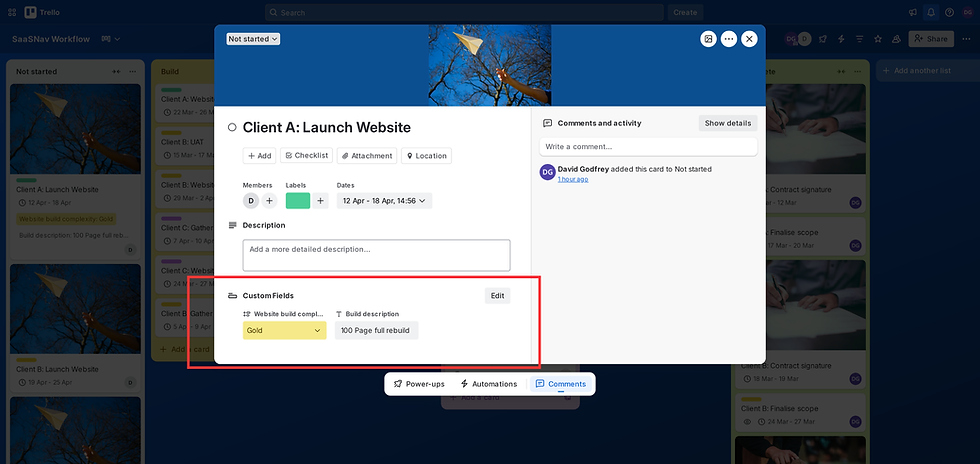
Screenshot: Trello card detail view displaying custom fields used to capture additional project information.
Custom fields allow teams to track structured information such as project budgets, deadlines, ROI, or priority levels directly within cards. During SaaSNav testing, we added custom fields to track website build difficulty using a simple gold, silver, and bronze categorisation, alongside a text field for project descriptions across our example board. The setup process was straightforward, and the additional data became immediately visible on relevant cards, improving task clarity without complicating the board layout.
Teams managing very large datasets should be aware that heavy use of custom fields can sometimes affect board loading speed. That said, Trello’s consistent board-based interface helps keep the overall experience intuitive and easy to navigate. In our testing, performance remained stable even as boards became more detailed.
Reliability, Support & Limitations
In our testing, Trello handled high-activity boards with consistent stability, which is important for growing teams and agencies managing multiple projects. We did encounter a minor issue when assigning cards to team members. On a few occasions, the card was assigned twice to the same person. The issue could usually be resolved by clicking in and out of the card, making it more of a minor annoyance than a significant workflow problem. It did, however, provide an opportunity to test Trello’s support process.
Support is delivered through Trello’s parent company, Atlassian, using the Atlassian support platform. The primary contact method is a support form rather than live chat. An AI assistant is available initially to help route queries before they are passed to the appropriate support channel. In our case, the request was routed through the Atlassian ticketing system and we received an emailed-response in only eleven minutes. The support team asked for additional details and suggested the issue may have been a temporary browser-related glitch. When we tested the workflow again several hours later, the problem was no longer present.

Screenshot: Support request submitted through the Atlassian help centre used for Trello support queries.
Offline access remains limited for teams working in areas with unstable internet connections. Like most cloud-based project management platforms, Trello relies on an active connection to maintain real-time updates and synchronisation across boards.
Trello continues to release regular updates and incremental improvements, indicating ongoing development of the platform. In our testing, the underlying infrastructure remained stable and responsive, suggesting it is generally dependable for teams managing day-to-day project workflows.
Features alone do not determine long-term value. Next, we examine Trello’s pricing structure, per-user costs, and how its scaling model affects overall return on investment.
Trello Pricing Explained (Free vs Paid Plans)
Free Plan – Evaluation
Trello’s free plan is enough to get you started with a basic Kanban board. You get do receive unlimited cards and unlimited storage (10 MB/file) for up to ten boards per workspace. However, the free plan is not as generous as those of competitors. For example, calendar view, dashboard view and certain color-customizations are hidden behind paid plans.
Professional Tiers – When to Switch
As teams grow beyond the basics, upgrading to Standard or Premium unlocks key features like Dashboard, Timeline, and Table views. These views help teams coordinate more complex workflows. Enterprise adds organisational controls and security features for larger teams. The $10 per user per month price tag is competitive.
Realistic Monthly Investment
Trello uses a per-seat pricing model, so costs scale with team size. While Standard and Premium offer strong capability per user, a 10-person team will always cost roughly $100–$175+ per month on paid tiers. For larger teams and long-term budgeting, this user-based cost model should be part of planning.
Operational Overhead & Add-ons
Don’t overlook the impact of automation limits and workspace views on productivity. Upgrading improves visibility and reporting, but you’ll need to assess whether features like dashboards and additional power-ups justify the per-seat cost for your team.
Is It Worth It?
Pricing accurate as of March 2026.
For teams transitioning from simpler tools, Trello provides excellent usability and affordability. Its per-seat pricing is fair for the simplicity and visual clarity it offers, but teams with complex roadmaps or scaling needs might find more robust project management platforms more cost-effective long term.
Trello Value for Money Verdict
Overall, Trello offers solid value for teams that prioritise visual project tracking and a relatively simple workflow structure. Its interface remains one of the more intuitive options in the project management space, allowing teams to gain visibility across tasks without a steep technical learning curve. For collaborative organisations managing multiple client workflows, the Standard and Premium plans can offer reasonable value by bringing automation, integrations, and reporting into a single platform.
✓ Pros
-
Clean, visual interface with color-coded boards for easy task tracking
-
Flexible board and column structure that adapts to many workflows
-
Built-in automation to reduce manual admin work
-
Strong dashboard visibility for tracking projects in real time
-
Wide range of integrations and Power-Ups for extended functionality
Our review is based on hands-on testing in real-world business environments, focusing on Trello’s practical strengths and everyday workflow limitations.
Trello Pros & Cons
✗ Cons
-
Per-user pricing can become expensive as teams grow
-
Key features like advanced automation and admin controls require higher-tier plans
-
Large, data-heavy boards can occasionally load more slowly
-
Mobile app is best for updates, not full workflow configuration
-
Although there are plenty of third-party integrations available, some of these are paid for add-ons
Official site link
Some links on this page may be affiliate links. If you sign up through them, we may earn a commission at no extra cost to you. Our Trello reviews remain independent and unbiased.
Final Verdict: Is Trello Right for You?
Verdict Summary
Trello
Trello is a visual project management platform designed for individuals or teams that value clarity and flexibility in how work is organised. Its board-based structure, combined with built-in automation and a wide range of integrations, makes it adaptable to a variety of workflows, from marketing campaigns to product development.
Trello follows a per-user pricing model, which can become more expensive as teams scale. For many organisations, however, the time saved through automation and simplified task management may offset some of these costs.
Overall, Trello remains a practical option for individuals or teams that prefer visual task management and relatively straightforward workflows. It is also recommended to those that perhaps have not used online project management tools before. Organisations that require deeper reporting, advanced project planning tools, or more structured governance may find more specialised platforms better suited to those needs.
Key Strengths
- Visual task management with clear board-based workflows
- Built-in automation for recurring tasks and simple workflow rules
- Flexible structure that can adapt to a range of project types
Official site link
Ideal For
Small to mid-sized teams and growing businesses that prefer a visual approach to project management. Trello is particularly suited to organisations that need straightforward collaboration, simple automation, and flexible workflow structures without the complexity of more advanced enterprise platforms.
★★★★
4.3 / 5
Some links on this page may be affiliate links. If you sign up through them, we may earn a commission at no extra cost to you. Our reviews remain independent and unbiased.
Trello FAQs & Key Questions Answered
This independent Trello review answers the most common questions about Trello pricing, features, alternatives, and real-world performance for freelancers, agencies, and small teams.
Official site link
Some links on this page may be affiliate links. If you sign up through them, we may earn a commission at no extra cost to you. Our reviews remain independent and unbiased.