
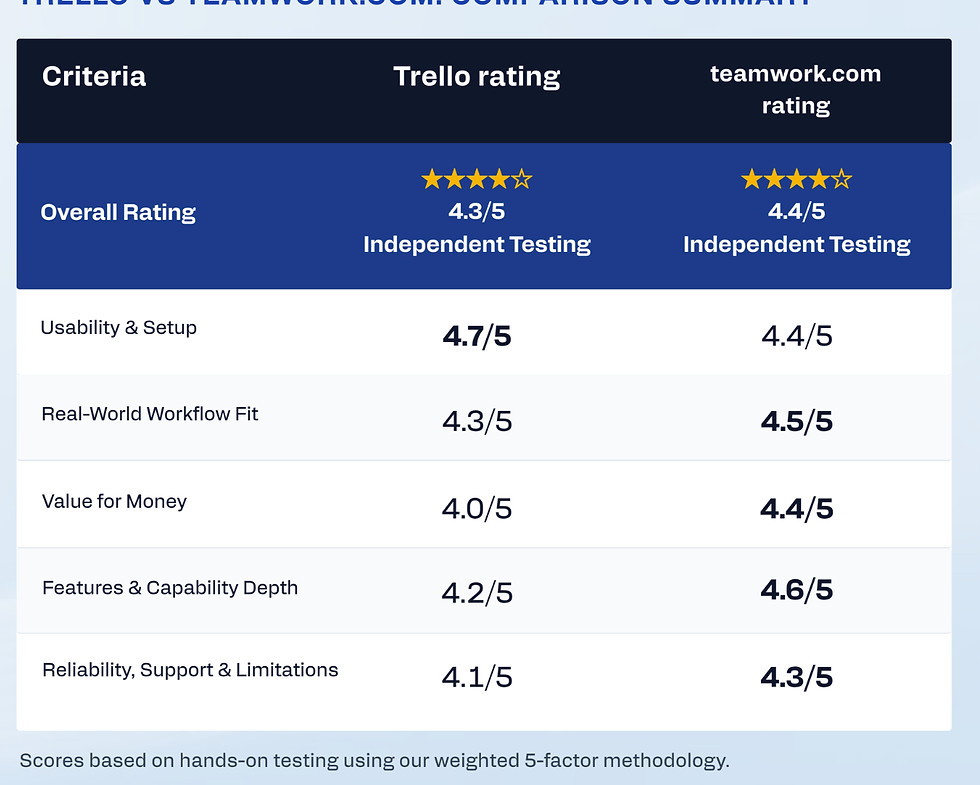
Criteria
Trello rating
teamwork.com rating
Overall Rating
★★★★☆
4.3/5
Independent Testing
★★★★☆
4.4/5
Independent Testing
Usability & Setup
4.7/5
4.4/5
Real-World Workflow Fit
4.3/5
4.5/5
Value for Money
4.0/5
4.4/5
Features & Capability Depth
4.2/5
4.6/5
Reliability, Support & Limitations
4.1/5
4.3/5
Trello vs teamwork.com: Comparison Summary
Scores based on hands-on testing using our weighted 5-factor methodology.
Trello vs teamwork.com (2026): Which Project Management Tool Is Best?
🏆 Winner: teamwork.com (Best Overall for Agencies & Client Work)
Trello is one of the easiest project management tools to learn, making it an excellent choice for simple task tracking and Kanban workflows. teamwork.com builds on that ease of use by adding powerful Timeline planning, automation, reusable templates, and client-focused project management.
Based on our hands-on testing, teamwork.com is the better overall choice for freelancers, agencies, and growing businesses that need more than basic task management. Trello remains an outstanding option for individuals and small teams that value simplicity above all else.
Independent comparisons • No vendor bias • Real-world testing
Trello vs teamwork.com Comparison: Quick Verdict
No credit card required
No credit card required
Trello vs teamwork.com Comparison: Quick Answer
Based on our hands-on testing, teamwork.com is the better overall choice for most users thanks to its stronger feature set, client-focused workflows, and powerful project management tools. Trello remains an excellent option for individuals and small teams who want a simple, visual Kanban board with minimal setup.
The 30-Second Verdict
If you want a simple, visual project management tool that's easy to learn, Trello remains one of the best Kanban platforms available. Its clean interface and straightforward workflow make it ideal for individuals, freelancers, and small teams managing uncomplicated projects.
However, if you need Timeline planning, automation, reusable templates, and dedicated client project management tools, teamwork.com delivers a more complete platform that can grow alongside your business.
Trello is best if…
-
You prefer simple Kanban boards over feature-heavy software.
-
You want to get started quickly with minimal setup.
-
Your projects are straightforward and don't require advanced planning.
-
You mainly manage personal tasks or small team workflows.
-
Ease of use is your highest priority.
Free forever plan available
You’ll prefer teamwork.com if…
-
You manage multiple client projects or agency work.
-
You need Timeline planning, automation, and reusable templates.
-
Your projects involve dependencies or more structured workflows.
-
You want a platform that scales as your business grows.
-
You need professional project management without enterprise-level complexity.
Free forever plan available
Some links on this page may be affiliate links. If you sign up through them, we may earn a commission at no extra cost to you. Our reviews remain independent and unbiased.
Scorecard Battle
Trello vs teamwork.com: Head-to-Head Comparison
A category-by-category comparison of Trello vs teamwork.com, based on real-world testing across usability, workflow flexibility, pricing, feature depth, and long-term scalability.
Usability & Setup
The speed and intuition of onboarding and team adaptation.
Trello
Trello offers one of the simplest onboarding experiences available. Its intuitive Kanban boards and clean interface make it incredibly easy to learn, allowing individuals and small teams to get started in minutes.
Winner
4.7/5
Workflow Fit
How the tool adapts to different project methodologies and scales.
Trello
Trello excels at lightweight task management and visual workflows. It's perfect for personal projects, freelancers, and small teams that don't require advanced planning or complex project dependencies.
4.3/5
Value for Money
Analyzing plan density, feature availability, and long-term costs.
Trello
Trello offers excellent value for individuals and small teams thanks to its generous free plan and simple pricing. However, many advanced capabilities require paid plans or Power-Ups.
4.0/5
Features & Depth
The breadth of native capabilities versus reliance on external additions.
Trello
Trello focuses on simplicity rather than feature depth. Its Kanban boards remain excellent, but advanced reporting, automation, and project planning are more limited than many competitors.
4.2/5
Reliability & Support
Platform stability and the quality of customer service over time.
Trello
Trello is fast, reliable, and extremely stable for day-to-day task management. Its straightforward design contributes to an excellent overall user experience.
4.1/5
Affiliate Link Disclosure: Our testing is independent. We may receive commissions from some of the links on this page at zero cost to you, which supports our testing lab.
Free forever plan available
teamwork.com
teamwork.com combines an intuitive interface with more advanced project management capabilities. Reusable templates, guided onboarding, and clear project organization make it easy to adopt without feeling overwhelming.
4.4/5
teamwork.com
teamwork.com delivers significantly greater workflow flexibility with Timeline planning, automation, reusable templates, and client-focused project management. It scales far more effectively as projects become more complex.
Winner
4.5/5
teamwork.com
teamwork.com provides stronger long-term value by including professional project management features such as Timeline planning, automation, and client workflows. For growing businesses, the additional functionality easily justifies the investment.
4.4/5
Winner
teamwork.com
teamwork.com offers a far more comprehensive feature set, combining automation, Timeline planning, reusable templates, extensive integrations, and dedicated client project management tools in a platform that's still easy to use.
Winner
4.6/5
teamwork.com
teamwork.com was consistently reliable during our testing, and when we contacted support after encountering a temporary issue, we received a prompt and helpful human response. The platform combines dependable performance with excellent customer support.
4.3/5
Winner
Free forever plan available
🏆 Winner: teamwork.com (Best Overall)
teamwork.com is the stronger overall platform thanks to its intuitive interface, powerful automation, excellent Timeline planning, and client-focused project management tools. It offers significantly more capability than Trello while remaining easy to learn, making it the best choice for freelancers, agencies, and growing businesses.
No credit card required
Best for Simple Kanban Workflows: Trello
Choose Trello if you want a lightweight, visual task management tool that's incredibly easy to learn. Its clean Kanban boards are perfect for personal projects, freelancers, and small teams that don't need advanced planning, reporting, or workflow automation.
No credit card required
Trello vs teamwork.com for Freelancers
Trello and teamwork.com are both excellent choices for freelancers, but they solve different problems. Trello focuses on simplicity and visual task management, while teamwork.com offers a more complete project management platform with dedicated client workflow tools.
Trello
Trello is an excellent choice for freelancers who want a lightweight, visual way to organize projects. Its intuitive Kanban boards make it easy to manage tasks, collaborate with clients, and stay organized without spending time configuring the platform.
Freelancers with straightforward workflows will appreciate Trello's simplicity, although those managing multiple clients or more complex projects may eventually outgrow its feature set.

teamwork.com
teamwork.com feels purpose-built for freelancers, consultants, and agencies managing multiple clients. Reusable templates, intuitive automation, Timeline planning, and excellent project organization make it easy to standardize client work without unnecessary complexity.
For freelancers balancing multiple projects, teamwork.com offers one of the best combinations of usability, capability, and long-term scalability we've tested.

Trello vs teamwork.com: In-Depth Comparison
A closer look at how Trello and teamwork.com perform in real-world project management workflows, highlighting where each platform excels and where limitations may appear as projects become more demanding.
BEST FOR: SIMPLE VISUAL TASK MANAGEMENT
Trello Strengths
Trello focuses on simplicity, making it one of the easiest project management tools to learn. Its visual Kanban boards help individuals and small teams organize work quickly without the complexity of larger project management platforms.
-
Extremely intuitive drag-and-drop Kanban boards
-
Fast onboarding with virtually no learning curve
-
Clean, distraction-free interface
-
Excellent for personal projects and small teams
-
Generous free plan for lightweight task management
BEST FOR VISUAL CLIENT PROJECT MANAGEMENT
teamwork.com Strengths
teamwork.com combines intuitive project management with professional workflow tools designed for client work. Timeline planning, automation, reusable templates, and excellent project organization make it particularly effective for agencies, consultants, and growing businesses.
-
Intuitive onboarding with minimal setup
-
Excellent Timeline view with dependencies and critical path
-
Powerful automation that's easy to configure
-
Reusable templates for client workflows
-
Strong integrations with Slack, Google Workspace, Microsoft Teams, and more
Trello limitations
-
Limited support for complex project planning
-
Advanced reporting and workflow tools require Power-Ups
-
Automation is less comprehensive than dedicated project management platforms
-
Growing teams may eventually outgrow its feature set
Quick Summary Ahead!
teamwork.com limitations
-
Board view feels less polished than other views
-
Custom fields aren't available consistently across every view
-
Dashboard customization is somewhat limited
-
AI assistant is helpful but less capable than some leading competitors
Some links on this page may be affiliate links. If you sign up through them, we may earn a commission at no extra cost to you. Our reviews remain independent and unbiased.
Final Conclusions
When to Choose Trello vs teamwork.com
Choose Trello if you want a simple, visual Kanban board that's quick to learn and easy to manage. It's ideal for personal projects, freelancers, and small teams with straightforward workflows that don't require advanced planning or automation.
Free forever plan available
Choose teamwork.com if you want powerful project management that's easier to learn and manage day to day. Its intuitive interface, reusable templates, automation, and excellent Timeline view make it ideal for agencies, consultants, freelancers, and growing businesses.
Some links on this page may be affiliate links. If you sign up through them, we may earn a commission at no extra cost to you. Our reviews remain independent and unbiased.
Free forever plan available
Trello vs teamwork.com: Final Verdict
Both Trello and teamwork.com are excellent project management tools, but they are designed for different types of users.
Trello stands out for its simplicity. Its intuitive Kanban boards and minimal learning curve make it an excellent choice for individuals, freelancers, and small teams managing straightforward projects without unnecessary complexity.
teamwork.com, on the other hand, builds on that simplicity with professional project management features such as Timeline planning, automation, reusable templates, and client-focused workflows. It offers a better balance of usability and capability, making it the stronger long-term choice for agencies, consultants, freelancers managing multiple clients, and growing businesses.
Both offer free forever plans — start risk-free.
Some links on this page may be affiliate links. If you sign up through them, we may earn a commission at no extra cost to you. Our reviews remain independent and unbiased.
Explore More Project Management Comparisons
Looking at other project management tools? Explore these related comparisons to see how Trello, teamwork.com, and other leading platforms compare across features, pricing, automation, and ease of use.

VS
Compare ClickUp's AI, automation, and customization with teamwork.com's intuitive client-focused project management and Timeline planning.
VS
Compare teamwork.com's client project management features with monday.com's visual workflows and automation.
Trello vs teamwork.com FAQs & Key Questions Answered
This independent Trello vs teamwork.com comparison answers the most common questions about pricing, usability, automation, reporting, and overall suitability for freelancers, small teams, and growing businesses.
Some links on this page may be affiliate links. If you sign up through them, we may earn a commission at no extra cost to you. Our reviews remain independent and unbiased.
Official site link
Official site link
How We Compare Project Management Software
At SaaSNav, we independently compare project management software using real freelancer and small-team workflows rather than relying solely on vendor marketing materials. Our goal is to help you quickly identify which platform best suits your way of working.
Every comparison follows the same evaluation framework, allowing you to compare software consistently across the factors that matter most to freelancers and growing teams.
Want to see exactly how we score each platform?
Visit our Methodology page to learn more about our evaluation process and scoring system.